Icon of program: JoyToKey

JoyToKey for Windows

  • Trial version
  • 3.1
    270
  • 90.9K
  • V7.3.2
Download for Windows

View an ad to download for free

Turn Your PC Gamepad's Input Into Keyboard Or Mouse Input.

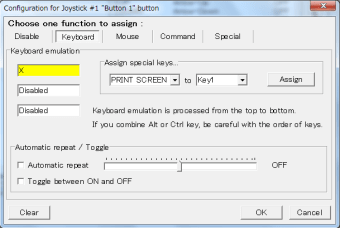
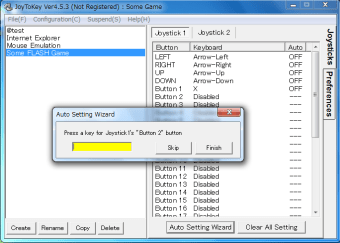
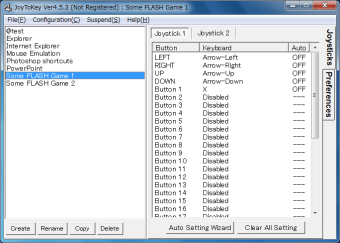
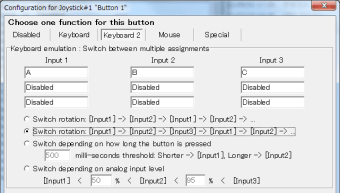
JoyToKey is a free gaming utility that allows the user to map gamepad or controller inputs (buttons, analog sticks...) to PC keyboard and mouse input (such as the WASD keys).

Top Recommended Alternative

Always custom, sometimes limited

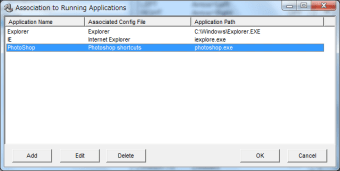
JoyToKey provides a number of useful features: it supports the most common console controllers as well as generic gamepads, and can map input to most keyboard keys as well as to mouse movement. Some games, like World of Warcraft: Battle for Azeroth, offer JoyToKey compatibility specifically, making it a great way to play these titles. On the other hand, you might suffer extra milliseconds of input lag in some games, which can make playing fast-paced games like first-person shooters more frustrating, and others, like Team Fortress 2, specifically limit what JoyToKey can do for you.

A joy enough

Overall, JoyToKey is worth grabbing if you have something specific you very much want to do with your controller. It's especially good for games with normally fixed keys and buttons (i.e. no controls configuration menu), because JoyToKey bypasses such restrictions and lets you make your own choices.


  • Pros

    • High hardware compatibility
    • Hotkeys easy to customise
    • Supports mouse input
    • Sometimes officially supported
  • Cons

    • Limited by some games
    • Learning curve
    • Possible input lag
    • JoyToKey and normal keys may overlap
 0/5

App specs

Program available in other languages


Icon of program: JoyToKey

JoyToKey for PC

  • Trial version
  • 3.1
    270
  • 90.9K
  • V7.3.2
Download for PC

View an ad to download for free


User reviews about JoyToKey

Have you tried JoyToKey? Be the first to leave your opinion!

Add review

You may also like

Alternatives to JoyToKey

Explore Apps

Latest articles

Laws concerning the use of this software vary from country to country. We do not encourage or condone the use of this program if it is in violation of these laws.
Softonic

Is JoyToKey safe?

99/100

Score result: Clean

This file passed a comprehensive security scan using VirusTotal technology. It is safe to download.

  • Virus free
  • Spyware free
  • Malware free
  • Verified by Security Partners

    VirusTotal logo

Scan Info

Last scan
Thursday, June 18, 2026
Scan provider
VirusTotal · Full report

File Integrity

File
JoyToKey_V7.3.2.exe
SHA256
0869820d01d49758c4187dcb61a2855df2f51f7b69f90e8cdbdf209ba412f984
SHA1
cfbb5960e1b09e317659c5bad0ba5a5d6af372a7

Softonic security commitment

JoyToKey has been thoroughly scanned by our advanced security systems and verified by industry-leading partners. This file comes from the official developer and has passed all our security checks, showing no signs of viruses, malware, or spyware. For more information, visit our Security and Trust Center

Signed in to Softonic as